

Introduction
This blog post is the fourth in a series focused on end-to-end data ingestion and transformation with Databricks, based on the principles of the Medallion architecture. The project will feature the vehicle datasets published by the Dutch RDW (national vehicle authority) and is aimed to exemplify a basic data processing workflow using core Databricks functionalities. Here we explore the creation of companion apps using LLMs such as Claude Code, which offer exciting new possibilities for interacting with your project data.
The entire blog series consists of:
Blog 1: Data Ingestion Framework & Medallion Architecture - The secrets of bronze, silver, and gold
Blog 2: Data Quality Checks with DQX - DQX: We do not trust the data we have not validated
Blog 3: Dashboard Automation with Claude Code - Claude meets JSON: automating Databricks dashboards
Blog 4: Companion App for Data Exploration - You need a companion to explore your data
Blog 5: Asset Bundle Deployment - Deploy your project like a pro with Databricks Asset Bundles
Blog 6: Cost Optimization & Analysis - It’s all great, but how much does it cost?
Why Build a Companion App
Typical data pipelines include ingestion, transforming, cleaning, and validating. Once finished, and having obtained a trusted dataset, its data is usually monitored with a dashboard or through ad-hoc SQL queries and is then exposed to downstream systems. This leaves a lot to be desired in terms of intuitive interaction with your datasets.
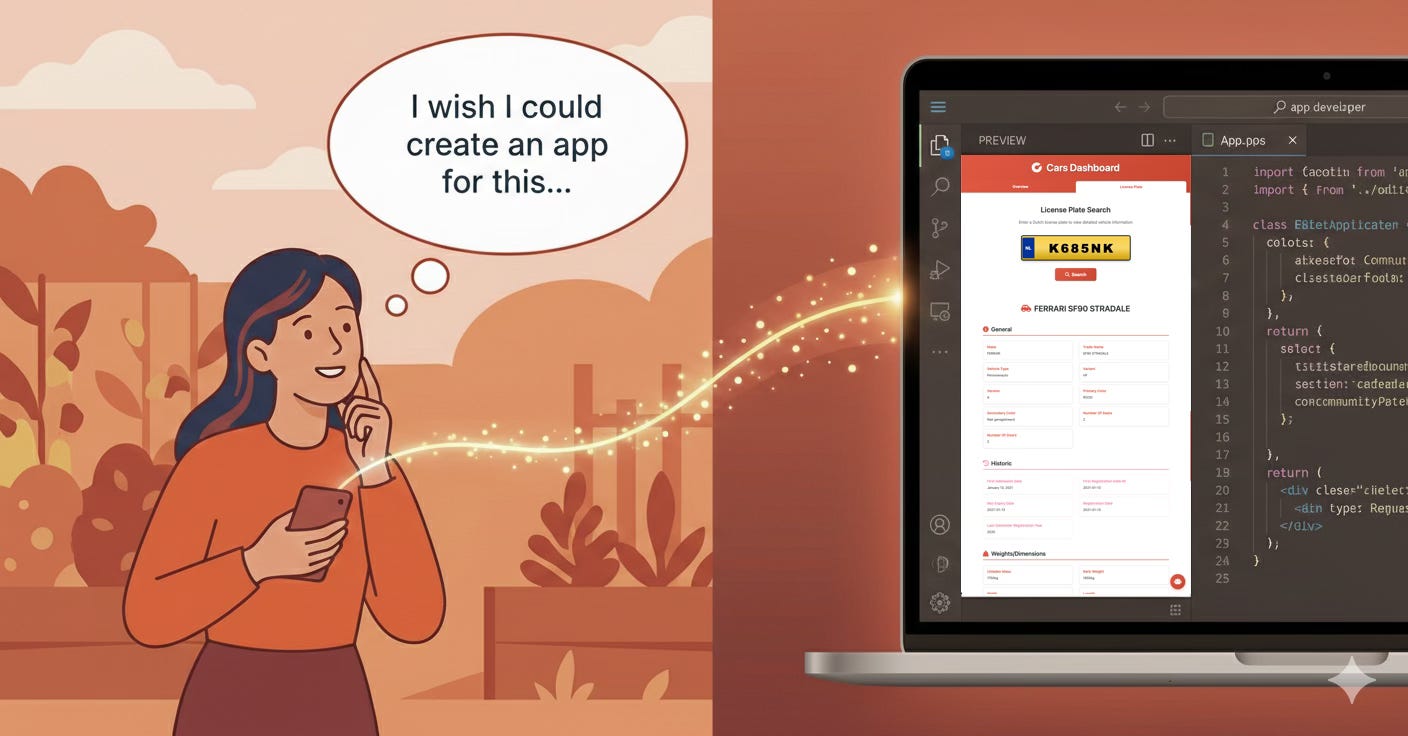
Building a companion app offers something different: a lightweight and interactive way to use your data in a real setting, instead of just focusing on reporting statistics and analytics. Our RDW companion app made it possible to explore what types of vehicles are live on the Dutch roads, and see their details. It is also possible to look up an existing license plate to see more specific information.
There are a few reasons why this is valuable:
Validating your pipelines: Manual inspection of your data through a visual UI is perhaps the most effective way to reveal potential issues with your data quality. You can quickly navigate through specific data and spot details that are abstracted away in dashboards or aggregation queries. In addition, it helps to develop a deeper understanding of your data and show what issues (e.g., edge cases) may arise in real world implementations.
Making data accessible: A front-end application makes it very intuitive to interact with your data, and moreover, allows others to do this as well. Other users such as colleagues or stakeholders without specific SQL or programming skills are now enabled to work with the data, making the project more accessible. For example, you could use it to create an app where non-technical stakeholders that have in-depth knowledge of the data can validate it.
Useful: Depending on the type and sensitivity of your data, the companion app may actually become a handy tool on its own and provide additional value to your pipelines!
Previously, these reasons may not have warranted the overhead for data engineers, but with the advent of LLM-assisted coding (“Vibe coding”), it has become incredibly easy and quick to build Python web apps, even with ample knowledge of front-end development.
With novel tools such as Claude Code, you can describe what you are looking for and iterate towards a working application quickly. This allows users to realise a working prototype or PoC within minutes. The barrier has been lowered so much that a companion app can become a natural extension of your project instead of a whole separate endeavour.
Core Features of Our App
The companion app for our RDW vehicles project is mainly focussed on looking up technical vehicle data. It features two main pages: Overview and License plate.
Vehicle overview
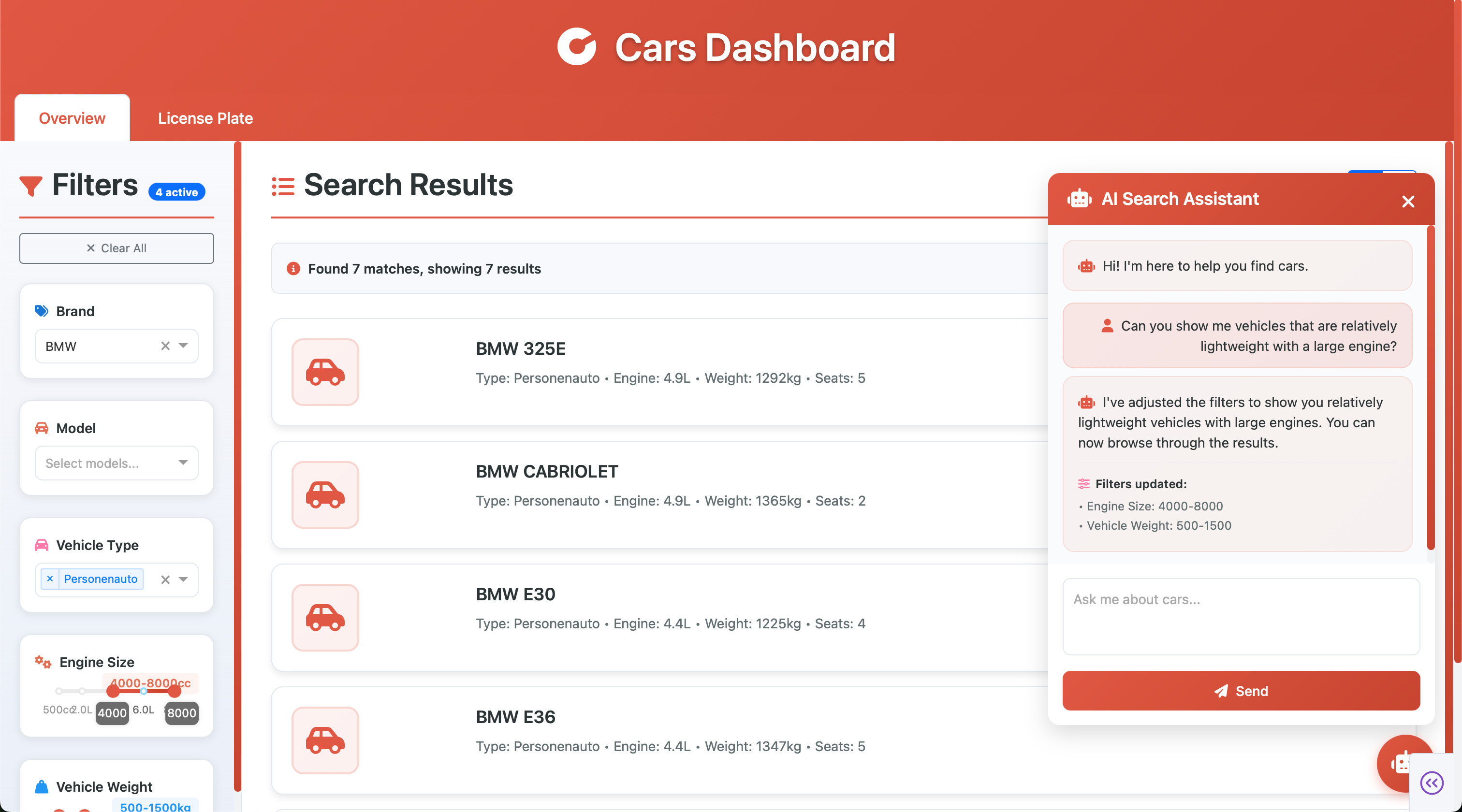
The main page features a vehicle overview which reads data from the registered_vehicles_dedup table, containing all unique vehicles in the RDW dataset. This page allows the user to view the vehicles belonging to the current selection, which is dictated by the filter options on the left-hand side. Filters include vehicle brands, models, and sliders for production year, engine displacement, weight, and number of seats.
As the table only contains unique vehicles, it is only intended for a general overview on the distinct cars existing in the dataset.
License plate lookup
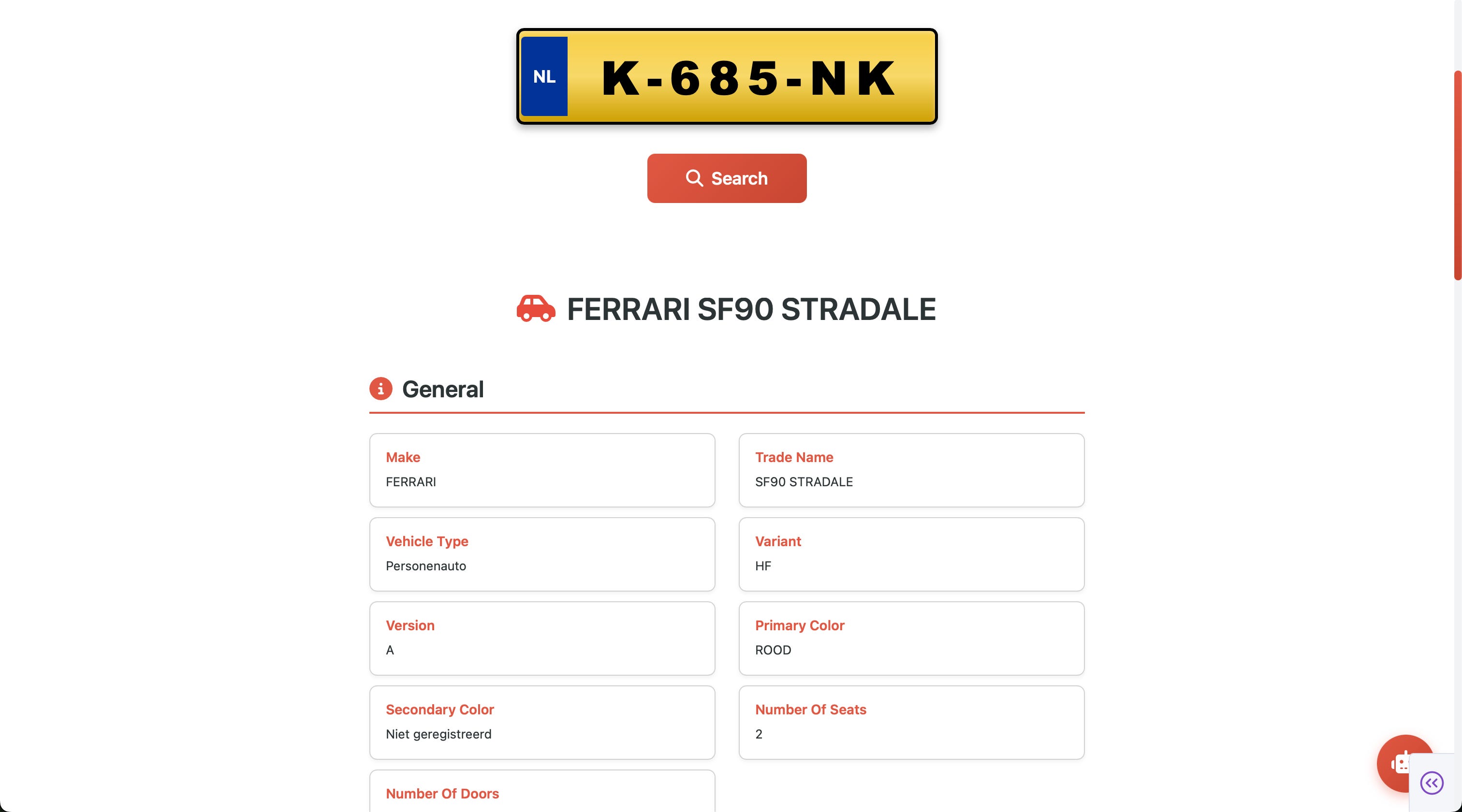
The second page is geared towards finding information about specific registered vehicles. The user can enter a license plate first, and is then shown detailed information:
AI-assistant
Both the overview and lookup pages are equipped with an AI-assistant chatbot. In the overview page, it is possible to chat with the assistant in natural language and have the assistant change the filters accordingly. For example, you can prompt the assistant to display lightweight vehicles with large engine displacements:
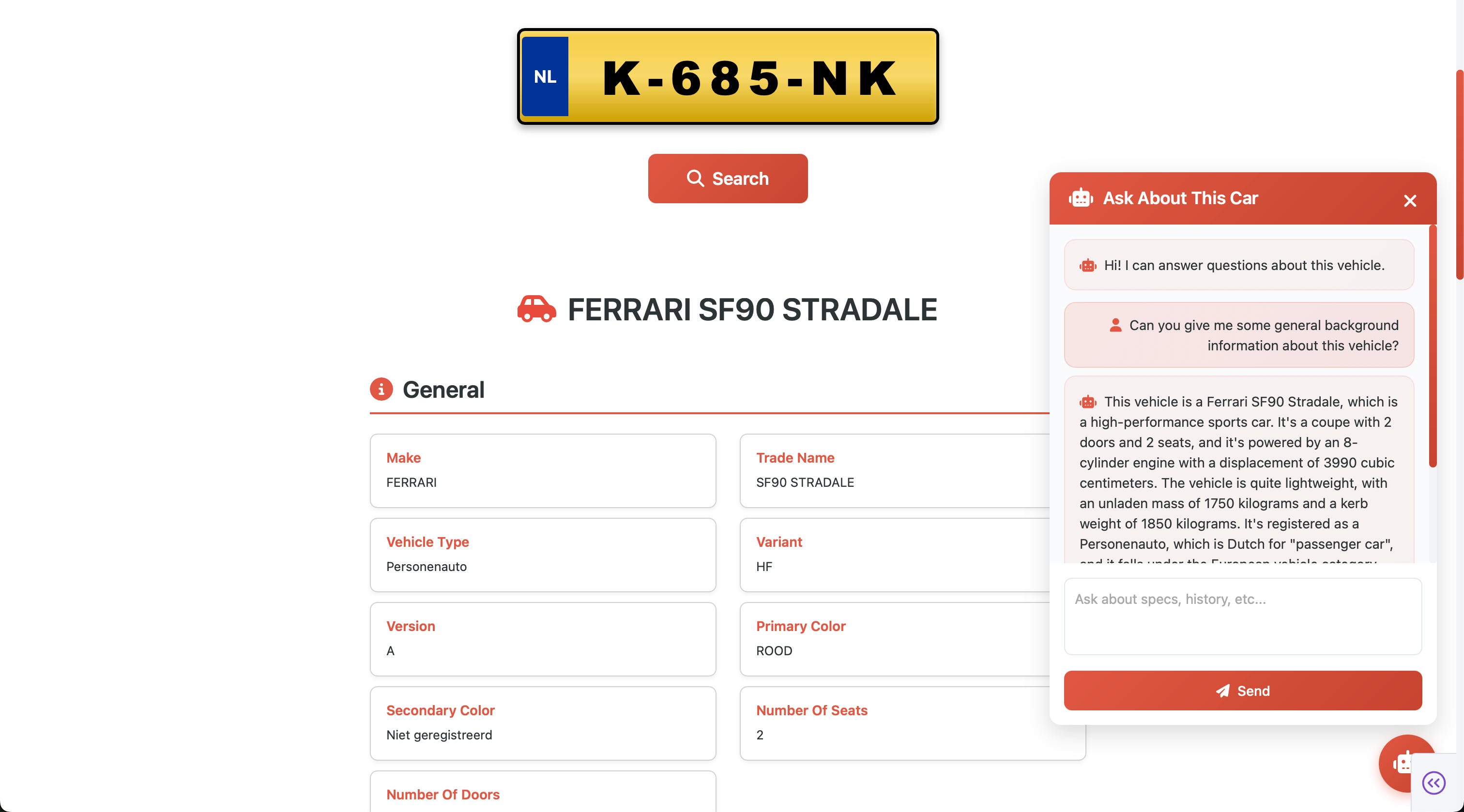
It is also possible to chat with the assistant in the license plate lookup. Once a plate has been given and the subsequent detail page is loaded, users can chat with the assistant and ask questions about the currently viewed vehicle. This makes it possible to ask about general background or more specific vehicle-related information:
Technical Architecture
There are some things to consider for the technical backend of such an app. We used Python Dash to run our web app in. For all debugging purposes it was hosted locally. Once happy with the result, it was packaged as a Databricks app and added to the Databricks Asset Bundle (DAB) to deploy with the package itself. In your databricks.yml, you can include the app as follows:
apps:
  rdw_webapp:
    name: "rdw-webapp-${bundle.target}"
    description: "RDW Vehicle Data Dashboard"
    source_code_path: ./webapp
    permissions:
      - user_name: your@email.com
        level: CAN_MANAGE
Authentication
The Databricks SDK’s WorkspaceClient handles authentication for REST API calls, while DatabricksSession from Databricks Connect handles Spark data access. One of the nice properties here is that both use Databricks’ unified authentication, they natively work with your Databricks credentials once deployed as a Databricks App, and in local development they use your CLI configured profile(s) or environment variables.
from databricks.sdk import WorkspaceClient

# Automatically authenticated
workspace_client = WorkspaceClient()

# For API calls, get auth headers from the SDK
auth_headers = workspace_client.config.authenticate()
# Returns: {"Authorization": "Bearer <token>"}
Permissions
When you deploy a Databricks App, it automatically creates a service principal for your application. However, this service principal has no permissions by default and you will need to explicitly grant access to the resources your app needs.
For our dashboard, we had to grant the app’s service principal access to the required table. You can find your app’s service principal in the Databricks App settings, then grant permissions via the Catalog Explorer UI or using SQL.
Currently, it is not able to define your service principal or permissions upfront with the deployment of the bundle, meaning that manual setup of permissions (depending on your use case) will be required.
Retrieving Data
We use Databricks Connect with serverless compute for table access. The main benefit for this application is no cluster startup required, allowing for instant querying and table retrieval.
from databricks.connect import DatabricksSession

def _get_spark_session():
    return DatabricksSession.builder.serverless(True).getOrCreate()

# Query Unity Catalog directly
spark = _get_spark_session()
df = spark.table("gold_catalog.rdw_etl.registered_vehicles_dedup")
The overview page uses the deduplicated table. During load, it selects only columns deemed necessary for our purposes to reduce size. The table is then loaded in memory as a local DF, requiring only around 500MB of RAM. Note that this may not work for you depending on the size of your table. The main benefit of maintaining the table in this way is that it makes filter and selection operations instant, without the need to run queries to the table stored in a catalog.
For the license plate lookup, the amount of potentially requested data is too large to store as a local DF. Here, the registered vehicles table is queried using SQL, looking up the requested row by its primary key (license plate). As a result, looking up a license plate requires a few seconds processing time.
Providing AI chat through LLM endpoint
The last component is the AI chat, which uses Databricks model serving endpoints under the hood. In our case, we used the databricks-meta-llama-3-1-70b-instruct endpoint, wrapped in a class.
import requests
from databricks.sdk import WorkspaceClient

class AIChat:
    def __init__(self, endpoint: str = "databricks-meta-llama-3-1-70b-instruct"):
        self.endpoint = endpoint
        self.workspace_client = WorkspaceClient()
        self.api_url = f"{workspace_host}/serving-endpoints/{endpoint}/invocations"

    def _get_structured_ai_response(
        self, user_message: str, current_filters: Dict[str, Any]
    ) -> str:
        """
        Get structured AI response for car filtering using Databricks LLM.

        Args:
            user_message (str): User's message/question
            current_filters (Dict): Current filter state

        Returns:
            str: AI response in JSON format
        """
        # Create a structured prompt that requests JSON output
        system_prompt = """You are a car search assistant. Analyze the user's request and respond with a JSON object containing:
            1. "message": A helpful response to the user
            2. "filters": Suggested filter changes based on their request

            Available filter categories:
            - "brands": List of car brands (e.g., ["BMW", "Mercedes", "Audi"])
            - "models": List of model names (e.g., ["320i", "520d"])
            - "vehicle_types": List of vehicle types (e.g., ["Personenauto"])
            - "engine_range": [min_cc, max_cc] (e.g., [1000, 3000])
            - "weight_range": [min_kg, max_kg] (e.g., [1000, 2000])
            - "seats": [min_seats, max_seats] (e.g., [4, 7] where 7 means 7+)
            - "year_range": [min_year, max_year] (e.g., [2010, 2020])

            Only include filter categories that should change based on the user's request. Use null for filters that shouldn't change.

            Example response:
            {
            "message": "I'll help you find cars",
            "filters": {
                "brands": ["BMW"],
                "models": null,
                "year_range": [2015, 2020],
                "vehicle_types": null,
                "engine_range": null,
                "weight_range": null,
                "seats": null
            }
            }

            In addition, you should also be able to converse with the user to discuss cars in general, to find any car.
            Once the user agrees with the car selection, adjust the filters to find this car."""

        user_prompt = f"""Current filters: {json.dumps(current_filters)}
            User request: {user_message}

            Please respond with a JSON object as specified."""

        headers = {
            "Content-Type": "application/json"
        }

        (...)

        payload = {
            "messages": [
                {
                    "role": "system",
                    "content": system_prompt
                },
                {
                    "role": "user",
                    "content": user_prompt
                }
            ],
            "max_tokens": 1000,
            "temperature": 0.3
        }

        response = requests.post(self.api_url, headers=headers, json=payload, timeout=60)
        return response.json()["choices"][0]["message"]["content"]
Specifically on the overview page the LLM is equipped to change the filters. This is performed by requesting a response structured in specific JSON syntax, making it easy to convert the LLM response into an actual filter on the page.
For the car lookup assistant, a different system prompt is used, that simply requires the assistant to answer questions, and is given as input the full information of the current vehicle such that it can incorporate that in the response. The LLM endpoint calling is the same.
Considerations
Whilst building a “vibe-coded” web app for your project can be very useful and is a fun exercise, there are obvious limitations.
Treat it as a personal or small-scale tool: Building apps this way (entirely vibe-coded) should be considered as a tool for personal- or small scale usage. Unless you are experienced in (frontend) application development, it is not recommended to publish on a large scale. Do not blindly give people access to your hosted app.
Vibe coding is no substitute for proper engineering: Similarly, vibe-coding gets you to a working prototype fast, but it often skips the fundamentals: testing, logging, authentication best practices, dependency management. If the app becomes critical to your workflow or others start relying on it, you will need to revisit these gaps. The more importance your app bears, the more you should invest time to understand what is under the hood, and not rely on LLM-generated code.
AI chats can be abused: Likewise, the AI chat can be abused. Not only are people using the app using your LLM endpoint (you are paying for it), there are no guardrails implemented making it very easy to bypass security in a variety of ways and (ab)use the LLM for other purposes than intended. If you want to use AI chat assistants in production, you must educate yourself on vulnerabilities such as prompt injection, jailbreaking, obfuscation, and so forth. The same goes for any other endpoint that your app is using, or exposes.
Conclusion
Building a companion app for your data project has become remarkably accessible with LLM-assisted coding. What used to require significant frontend expertise and development overhead can now be prototyped in a matter of hours. In our case, we built a simple web app to explore the RDW vehicle dataset, allowing for license plate lookups, browsing filtered results, and even natural language queries through a Databricks model serving endpoint. This approach turns your gold layer from a well-modelled table into something tangible and interactive.
There is a lot of potential in enabling non-technical stakeholders to interact with the data beyond statistics and dashboards, through webapps, which has become a manageable endeavour with LLM-assisted coding.
That said, vibe-coded apps come with clear limitations. They’re best suited for personal use or small-scale internal tooling, not production deployments. Be mindful of security considerations, especially when exposing AI endpoints.
In the upcoming blog posts we will dive deeper into various aspects of the project, such as deploying with Databricks Asset Bundles (DABs) and cost analysis.
I resonate with what you wrote. Building intuitive companion apps with LLMs is definitly the future for data exploraton. Spot on.